
How to Track Raw Materials in Shopify
5 min read
Shopify tracks the products you sell, not the materials they’re made from.
To track raw materials in Shopify, you need a list of your materials, the quantity each product variant uses, and a way to update material stock when products are made or sold. You can do that by hand in a spreadsheet, with components set up as products for simple kits, with a material inventory app, or with an ERP.
What Shopify tracks on its own
- Product stock per variant and location, which goes down when orders come in.
- Cost per item, a number you type in, used to report profit.
- Bundles: with the Shopify Bundles app, selling a fixed bundle deducts the products inside it.
You can create products for your materials, but Shopify doesn’t connect them to what you make: nothing uses them up when a product is made or sold.
Where raw materials fall through the gaps
- You don’t sell them, so orders don’t reduce their stock.
- One material goes into many products. The same thread might be in every hoodie, T-shirt, and tote.
- They come in real units. A hoodie might use 1.55 m of fabric and 35 m of thread. Shopify inventory counts whole units, not meters, grams, or liters.
- Production happens in between. Making a batch turns materials into stock, and Shopify has no place for that step.
- Raw materialsFabric, wax, labels
- ProductionMaterials become products
- Finished productsStock per variant
- OrdersProducts are sold
Missing in Shopify: using up materials, based on what each product needs, when you make or sell.
Tracked by Shopify: product stock goes down when orders come in.
Option 1: A spreadsheet
One row per material, updated by hand. It works with a handful of materials and orders, then slowly stops being trustworthy:
- Every order means working out which materials it used. Miss one and the numbers drift.
- “How many can I make?” means checking every material of every product.
- When a count is wrong, there’s no history to find out why.
Not sure if yours still works? See When to Replace Your Raw Material Inventory Spreadsheet.
Option 2: Components as products, with bundles
For simple kits made of whole pieces, like a jar, a lid, and a label, you can create a hidden product for each component and sell the kit as a fixed bundle with the Shopify Bundles app. Selling the bundle deducts its components.
Bundles are built for selling product combinations, not for manufacturing, so for most makers this breaks down:
- Bundles count whole units, which doesn’t fit fabric by the meter or wax by the gram.
- This setup has no way to record a production run.
- Your catalog fills with hidden items, and product costs are still typed in by hand.
Option 3: A material inventory app
An app adds the missing layer: your materials, and what each product is made of. It updates material stock when products are made or orders are fulfilled, and shows what you can make.
It makes sense as soon as updating material stock takes real time every week, or you’ve run out of something you thought you had. We compare what to look for, and the main apps, in Best Raw Material Inventory Apps for Shopify.
Option 4: An ERP or MRP system
These handle materials, purchasing, suppliers, warehouses, and production planning in one system. They fit factory-style operations with purchase orders and batch tracking, but take time to set up and cost more. For many Shopify brands, that’s more than they need.
How to choose
| Your situation | Best fit |
|---|---|
| A few materials and a few orders a week | A spreadsheet, or a free app plan |
| Whole-piece kits, no production step | Components as products, with bundles |
| Shared materials, real units, or batch production | A material inventory app |
| Purchase orders, warehouses, batch tracking | An ERP or MRP |
Example: a hoodie in Silva: Raw Material Inventory
We make Silva: Raw Material Inventory, so this example uses it.
You set up the materials for a hoodie, size M, once:
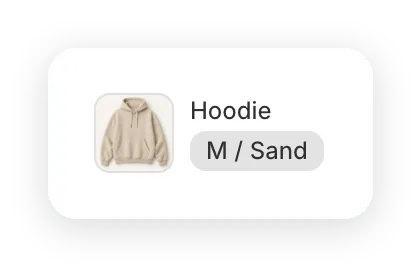
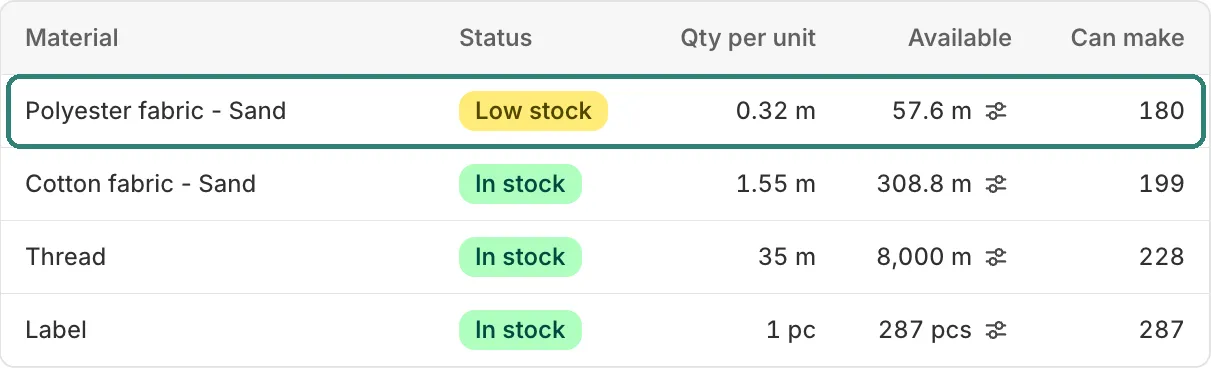
Each material shows its quantity per hoodie, its stock, and how many hoodies it covers.
See what you can make. With 308.8 m of Cotton fabric you could make 199, but 57.6 m of Polyester fabric only covers 180. The app shows 180: the material that runs out first sets the limit.
Choose when materials are used up. Each product, with all its variants, uses one of two settings, to match how you make it:
- When you record production: materials are deducted, and the finished products are added to Shopify inventory. This suits products made in advance.
- When orders are fulfilled: materials are committed when an order is placed, and deducted when it’s fulfilled. This suits products made to order.
For made-to-order products, you can also turn on Sync Shopify inventory: Shopify inventory then follows Can make, and checkout stops when a material runs out.
The hoodie is made in batches, so recording a batch of 50 uses up its materials and adds 50 hoodies to Shopify inventory.
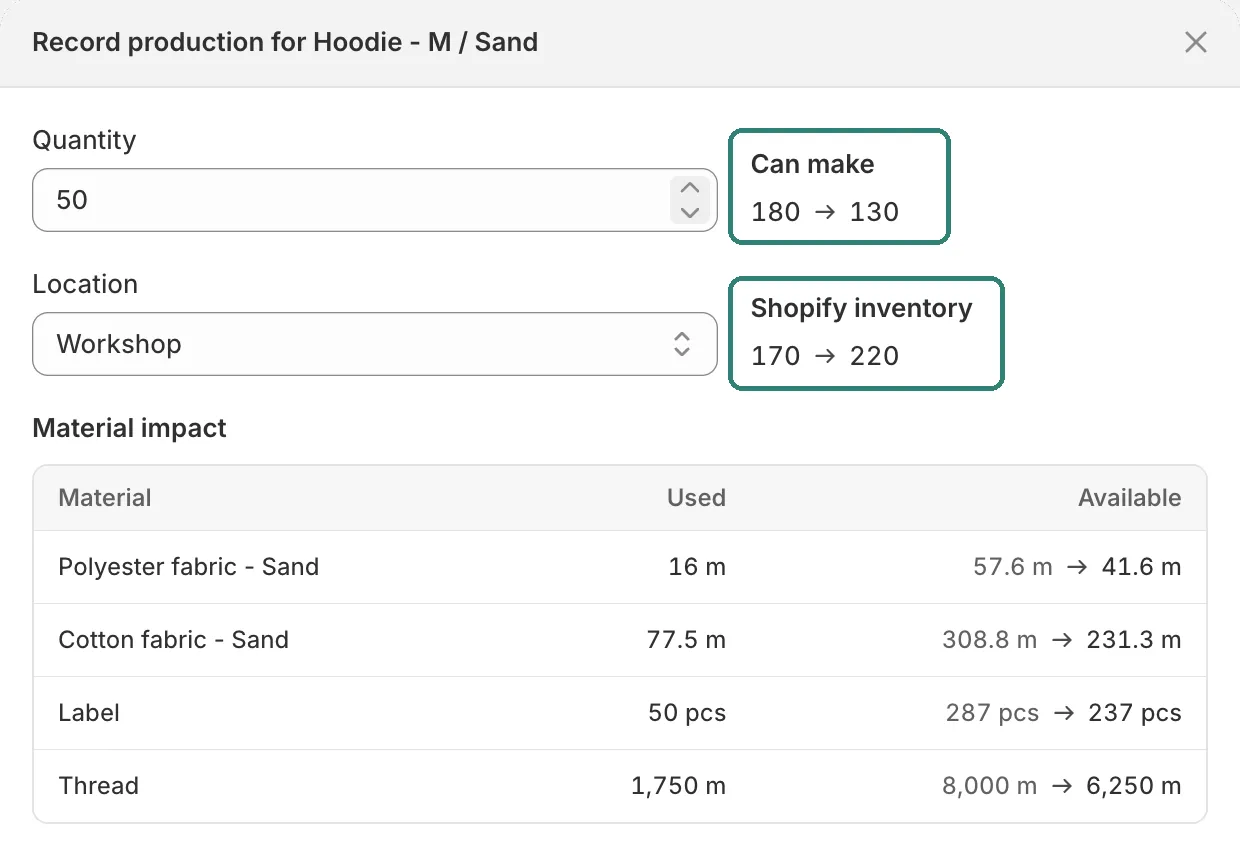
Recording 50 hoodies: “Can make” drops from 180 to 130, and Shopify inventory rises from 170 to 220.
Know the cost. Material costs add up, plus labor, packaging, or overhead, so each variant shows its cost and margin.
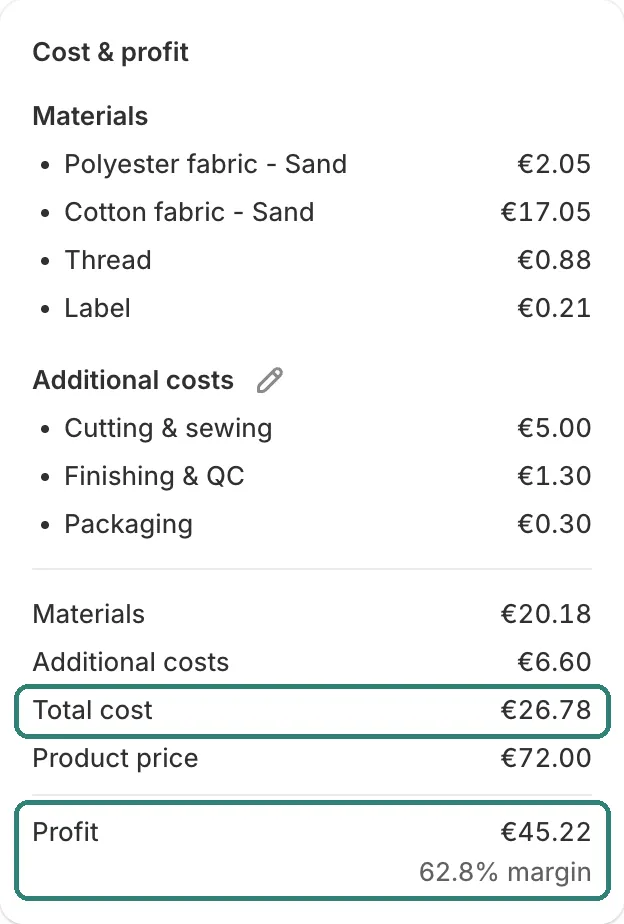
Total cost adds the hoodie’s materials to labor, finishing, and packaging. Profit and margin follow from its price.
To work out one product by hand, try the free Product Cost Calculator.
Every stock change is recorded, so you can always see why a number moved. Silva: Raw Material Inventory keeps one stock per material, not per location, and doesn’t handle purchase orders or batch tracking. If you need those, an ERP fits better.
Frequently asked questions
Can Shopify track raw materials? You can add materials as products, but Shopify won’t use them up when you make or sell something. For that, you need a spreadsheet, an app, or an ERP.
How do I track a material used by several products? Set the quantity each product variant uses. A material inventory app then adds up what every sale or production run uses, from the same material stock.
Getting started
Whichever option you pick, start by listing your materials, their units, and how much each product variant uses. If you’d rather not enter it yourself, ask us and we’ll import your spreadsheet or current app for you, free during early access.