
When to Replace Your Raw Material Inventory Spreadsheet
3 min read

Most brands start tracking raw materials in a spreadsheet, and for good reason: it’s free, flexible, and everyone knows how to use one. The question isn’t whether spreadsheets are bad. It’s when keeping one up to date by hand stops being reliable.
When a spreadsheet is enough
A spreadsheet works well when:
- You have a handful of materials and a few products.
- Orders are few enough to update the sheet after each one.
- One person makes the products and keeps the sheet.
- Running out of a material now and then isn’t costly.
If that’s you, keep it. When you outgrow it, you’ll usually notice the signs below first.
Signs your spreadsheet is no longer reliable
The counts don’t match the shelf. You count the fabric and the sheet says something else. Every gap means an update was missed or done twice.
You’ve run out of something you thought you had. This is the most expensive sign: an order you can’t make, or a production run that stops halfway.
Shopify keeps selling what you can’t make. Your spreadsheet can’t tell Shopify a material ran out, so made-to-order products stay on sale until a customer pays for something you can’t ship.
One sale touches many rows. A single hoodie uses a main fabric, a cuff fabric, a drawcord, thread, and four labels. Ten orders a day means dozens of edits.
“How many can I make?” takes too long. Answering it means checking every material a product uses, and the material that runs out first, for every product.
Only one person understands the file. Formulas, hidden tabs, and color codes that make sense to whoever built it, and nobody else.
You can’t tell why a number changed. A count drops by 12 and there’s no record of which order, batch, or correction caused it.
Your product costs are out of date. Worked out once, and never updated when material prices change. Check one product now with the free Product Cost Calculator.
You avoid updating it. When the sheet feels like a chore, updates get batched “for later”, and the numbers drift further.
If two or three of these sound familiar, your spreadsheet is costing more than it saves.
What changes with a material inventory app
An app keeps the same list your spreadsheet has, then does the updating for you:
- Material stock updates itself when you record production or when orders are fulfilled, depending on how you set up each product.
- Shopify only sells what you can make, for made-to-order products: with Sync Shopify inventory on, Shopify inventory follows Can make.
- You see how many you can make, for every variant, limited by the material that runs out first.
- Product costs stay current, built from the materials each product uses, plus labor and other costs.
- Every change is recorded, so you can always see why a number moved.
For one product, a hoodie in size M, it looks like this:

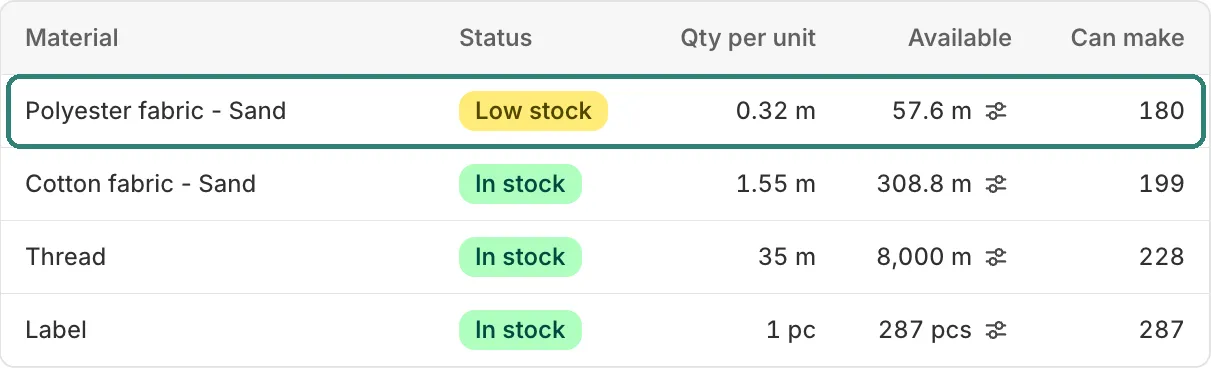
The same information as a spreadsheet, in Silva: Raw Material Inventory: quantity per hoodie, stock, and how many hoodies each material covers.
For a full walkthrough of the hoodie example, see How to Track Raw Materials in Shopify.
How to switch without losing a weekend
The setup is the part most makers dread. Two things make it easier.
Clean up the spreadsheet first. Whichever tool you move to, you’ll need the same three things:
- One row per material, with its unit (meters, grams, pieces) and current stock.
- The cost of each material, if you want product costs.
- For each product variant, the materials it uses and how much of each.
Then choose who does the setup.
- Do it yourself: with Silva: Raw Material Inventory, it’s free for life for early users, with no limits, so you can set up your products and see the numbers right away.
- Have it done for you: send us your spreadsheet and our team migrates it and sets everything up for you, for free.
If you’re still choosing an app, Best Raw Material Inventory Apps for Shopify compares the main options.
Frequently asked questions
Can I keep my spreadsheet alongside an app? During the switch, yes, as a check. After that, keep one source of truth: two lists updated separately will drift apart.
Does my spreadsheet need to be perfect before migrating? No. It needs the materials, their units and stock, and what each product uses. A recount on the day you switch is the best way to start from accurate numbers.